Creating a conference
Demo Workshop
Here we explain some of the steps for creation of a new conference on OpenReview system.
Some of the tasks described below (such as creation of a conference sub-group, creation of a submission, etc) can only be done using an administrator profile.
If you are registered as an administrator with OpenReview, you should already have admin privileges on a group representing your conference (e.g. ICML.cc/2019/Conference).
Following are the steps and brief explanations.
Login
Login can be done through the API
>>> import openreview
>>> client = openreview.Client(baseurl='https://openreview.net',username=<your username>,password=<your password>)
Creating a conference
You need admin privileges for creating subgroups within a group representing your conference (e.g. ICML.cc). When you create new groups, they must be subgroups of this conference (e.g. ICML.cc/2019)”
To create the conference you represent, Openreview team will create a group
>>> client.post_group(openreview.Group(id = 'ICML.cc',
                                     readers = ['everyone'],
                                     writers = ['OpenReview.net'],
                                     signatories = ['ICML.cc'],
                                     signatures = ['OpenReview.net']))
{'cdate': 1532031329209,
'ddate': None,
'id': u'ICML.cc',
'members': [],
'nonreaders': [],
'readers': [u'everyone'],
'signatories': [u'ICML.cc'],
'signatures': [u'OpenReview.net'],
'web': None,
'writers': [u'OpenReview.net']}
Once you (the conference admin) receive information from the Openreview team that your conference root has been setup, you can begin to create subgroups under the root. For instance, to create an ICML.cc conference for 2019 following steps should be done by the conference admin:
>>> client.post_group(openreview.Group(id = 'ICML.cc/2019',
                                 readers = ['everyone'],
                                 writers = ['OpenReview.net'],
                                 signatories = ['ICML.cc/2019'],
                                 signatures = ['OpenReview.net']))
{'cdate': 1532031902863,
'ddate': None,
'id': u'ICML.cc/2019',
'members': [],
'nonreaders': [],
'readers': [u'everyone'],
'signatories': [u'ICML.cc/2019'],
'signatures': [u'ICML.cc'],
'web': None,
'writers': [u'ICML.cc']}
Next step would be to create another subgroup ‘ICML.cc/2019/Conference’:
>>> client.post_group(openreview.Group(id = 'ICML.cc/2019/Conference',
                                 readers = ['everyone'],
                                 writers = ['ICML.cc/2019'],
                                 signatories = ['ICML.cc/2019/Conference'],
                                 signatures = ['ICML.cc/2019'],
                                 members = [<Tilde id of members>],
                                 web = <Absolute path to JS file>))
{'cdate': 1531339441440,
'ddate': None,
'id': u'ICML.cc/2019/Conference',
'members': [],
'nonreaders': [],
'readers': [u'everyone'],
'signatories': [u'ICML.cc/2019/Conference'],
'signatures': [u'ICML.cc/2019'],
'web': u'\n// ------------------------------------\n// Basic venue homepage template\n//\n// This webfield displays the conference header (#header), the submit button (#invitation),\n// and a list of all submitted papers (#notes).\n// ------------------------------------\n\n// Constants\nvar CONFERENCE = "ICML.cc/2019/Conference";\nvar INVITATION = CONFERENCE + \'/-/Submission\';\nvar SUBJECT_AREAS = [\n  // Add conference specific subject areas here\n];\nvar BUFFER = 1000 * 60 * 30;  // 30 minutes\nvar PAGE_SIZE = 50;\n\nvar paperDisplayOptions = {\n  pdfLink: true,\n  replyCount: true,\n  showContents: true\n};\n\n// Main is the entry point to the webfield code and runs everything\nfunction main() {\n  Webfield.ui.setup(\'#group-container\', CONFERENCE);  // required\n\n  renderConferenceHeader();\n\n  load().then(render).then(function() {\n    Webfield.setupAutoLoading(INVITATION, PAGE_SIZE, paperDisplayOptions);\n  });\n}\n\n// RenderConferenceHeader renders the static info at the top of the page. Since that content\n// never changes, put it in its own function\nfunction renderConferenceHeader() {\n  Webfield.ui.venueHeader({\n    title: "ICML ",\n    subtitle: "Recent Advances in Ubiquitous Computing",\n    location: "University of Rostock, Germany",\n    date: "2017, August 04",\n    website: "https://studip.uni-rostock.de/seminar_main.php?auswahl=c9b2fd0a6f525ce968d41d737de3ccb5",\n    instructions: null,  // Add any custom instructions here. Accepts HTML\n    deadline: "Submission Deadline: 2017, June 15th at 11:59 pm (CEST) "\n  });\n\n  Webfield.ui.spinner(\'#notes\');\n}\n\n// Load makes all the API calls needed to get the data to render the page\n// It returns a jQuery deferred object: https://api.jquery.com/category/deferred-object/\nfunction load() {\n  var invitationP = Webfield.api.getSubmissionInvitation(INVITATION, {deadlineBuffer: BUFFER});\n  var notesP = Webfield.api.getSubmissions(INVITATION, {pageSize: PAGE_SIZE});\n\n  return $.when(invitationP, notesP);\n}\n\n// Render is called when all the data is finished being loaded from the server\n// It should also be called when the page needs to be refreshed, for example after a user\n// submits a new paper.\nfunction render(invitation, notes) {\n  // Display submission button and form\n  $(\'#invitation\').empty();\n  Webfield.ui.submissionButton(invitation, user, {\n    onNoteCreated: function() {\n      // Callback funtion to be run when a paper has successfully been submitted (required)\n      load().then(render).then(function() {\n        Webfield.setupAutoLoading(INVITATION, PAGE_SIZE, paperDisplayOptions);\n      });\n    }\n  });\n\n  // Display the list of all submitted papers\n  $(\'#notes\').empty();\n  Webfield.ui.submissionList(notes, {\n    heading: \'Submitted Papers\',\n    displayOptions: paperDisplayOptions,\n    search: {\n      enabled: true,\n      subjectAreas: SUBJECT_AREAS,\n      onResults: function(searchResults) {\n        Webfield.ui.searchResults(searchResults, paperDisplayOptions);\n        Webfield.disableAutoLoading();\n      },\n      onReset: function() {\n        Webfield.ui.searchResults(notes, paperDisplayOptions);\n        Webfield.setupAutoLoading(INVITATION, PAGE_SIZE, paperDisplayOptions);\n      }\n    }\n  });\n}\n\n// Go!\nmain();\n\n',
'writers': [u'ICML.cc/2019']}
Please note that this conference group does not show up under the header “Open for Submissions” on Openreview homepage unless an invitation for submission with a future due date is created (as shown in the screenshot below).

Although, the conference ‘ICML.cc/2019/Conference’ that we just created is not accessible from “Open for Submissions”, it can still be found on the Openreview homepage under the header “All Venues”.
Note that the conference’s URL is essentially the openreview url with the name of the conference group, i.e. “https://openreview.net/group?id=ICML.cc/2019/Conference”.

Note that the web field for the conference is either JS code or the absolute path of a JS file containing the code.
Sample JS file
// ------------------------------------
// Basic venue homepage template
//
// This webfield displays the conference header (#header), the submit button (#invitation),
// and a list of all submitted papers (#notes).
// ------------------------------------

// Constants
var CONFERENCE = "ICML.cc/2019/Conference";
var INVITATION = CONFERENCE + '/-/Submission';
var SUBJECT_AREAS = [
  // Add conference specific subject areas here
];
var BUFFER = 1000 * 60 * 30;  // 30 minutes
var PAGE_SIZE = 50;

var paperDisplayOptions = {
  pdfLink: true,
  replyCount: true,
  showContents: true
};

// Main is the entry point to the webfield code and runs everything
function main() {
  Webfield.ui.setup('#group-container', CONFERENCE);  // required

  renderConferenceHeader();

  load().then(render).then(function() {
    Webfield.setupAutoLoading(INVITATION, PAGE_SIZE, paperDisplayOptions);
  });
}

// RenderConferenceHeader renders the static info at the top of the page.
function renderConferenceHeader() {
  Webfield.ui.venueHeader({
    title: "ICML ",
    subtitle: "Recent Advances in Ubiquitous Computing",
    location: "University of Rostock, Germany",
    date: "2017, August 04",
    website: "https://studip.uni-rostock.de/seminar_main.php?auswahl=c9b2fd0a6f525ce968d41d737de3ccb5",
    instructions: null,  // Add any custom instructions here. Accepts HTML
    deadline: "Submission Deadline: 2017, June 15th at 11:59 pm (CEST) "
  });

  Webfield.ui.spinner('#notes');
}

// Load makes all the API calls needed to get the data to render the page
// It returns a jQuery deferred object: https://api.jquery.com/category/deferred-object/
function load() {
  var invitationP = Webfield.api.getSubmissionInvitation(INVITATION, {deadlineBuffer: BUFFER});
  var notesP = Webfield.api.getSubmissions(INVITATION, {pageSize: PAGE_SIZE});

  return $.when(invitationP, notesP);
}

// Render is called when all the data is finished being loaded from the server
// It should also be called when the page needs to be refreshed, for example after a user
// submits a new paper.
function render(invitation, notes) {
  // Display submission button and form
  $('#invitation').empty();
  Webfield.ui.submissionButton(invitation, user, {
    onNoteCreated: function() {
      // Callback funtion to be run when a paper has successfully been submitted (required)
      load().then(render).then(function() {
        Webfield.setupAutoLoading(INVITATION, PAGE_SIZE, paperDisplayOptions);
      });
    }
  });

  // Display the list of all submitted papers
  $('#notes').empty();
  Webfield.ui.submissionList(notes, {
    heading: 'Submitted Papers',
    displayOptions: paperDisplayOptions,
    search: {
      enabled: true,
      subjectAreas: SUBJECT_AREAS,
      onResults: function(searchResults) {
        Webfield.ui.searchResults(searchResults, paperDisplayOptions);
        Webfield.disableAutoLoading();
      },
      onReset: function() {
        Webfield.ui.searchResults(notes, paperDisplayOptions);
        Webfield.setupAutoLoading(INVITATION, PAGE_SIZE, paperDisplayOptions);
      }
    }
  });
}

// Go!
main();
Creating Submission Invitations
If you have administrator privileges in OpenReview, you will be able to create Invitations for Submissions for your conference using this API
>>> client.post_invitation(openreview.Invitation(id = 'ICML.cc/2019/Conference/-/Submission',
                                        readers = ['everyone'],
                                        writers = ['ICML.cc/2019/Conference'],
                                        signatures = ['ICML.cc/2019/Conference'],
                                        invitees = ['everyone'],
                                        duedate = 1562875092000,
                                        reply = {
                                                'forum': None,
                                                'replyto': None,
                                                'readers': {
                                                    'description': 'The users who will be allowed to read the above content.',
                                                    'values': ['everyone']
                                                },
                                                'signatures': {
                                                    'description': 'Your authorized identity to be associated with the above content.',
                                                    'values-regex': '~.*'
                                                },
                                                'writers': {
                                                    'values-regex': '~.*'
                                                },
                                                'content':{
                                                    'title': {
                                                        'description': 'Title of paper.',
                                                        'order': 1,
                                                        'value-regex': '.{1,250}',
                                                        'required':True
                                                    },
                                                    'authors': {
                                                        'description': 'Comma separated list of author names. Please provide real names; identities will be anonymized.',
                                                        'order': 2,
                                                        'values-regex': "[^;,\\n]+(,[^,\\n]+)*",
                                                        'required':True
                                                    },
                                                    'authorids': {
                                                        'description': 'Comma separated list of author email addresses, lowercased, in the same order as above. For authors with existing OpenReview accounts, please make sure that the provided email address(es) match those listed in the author\'s profile. Please provide real emails; identities will be anonymized.',
                                                        'order': 3,
                                                        'values-regex': "([a-z0-9_\-\.]{2,}@[a-z0-9_\-\.]{2,}\.[a-z]{2,},){0,}([a-z0-9_\-\.]{2,}@[a-z0-9_\-\.]{2,}\.[a-z]{2,})",
                                                        'required':True
                                                    },
                                                    'abstract': {
                                                        'description': 'Abstract of paper.',
                                                        'order': 4,
                                                        'value-regex': '[\\S\\s]{1,5000}',
                                                        'required':True
                                                    },
                                                    'pdf': {
                                                        'description': 'Upload a PDF file that ends with .pdf',
                                                        'order': 5,
                                                        'value-regex': 'upload',
                                                        'required':True
                                                    }
                                                }
                                        }))
{'cdate': 1531339106644,
'ddate': None,
'duedate': 1562875092000,
'id': u'ICML.cc/2019/Conference/-/Submission',
'invitees': [u'everyone'],
'multiReply': None,
'noninvitees': [],
'nonreaders': [],
'process': None,
'rdate': None,
'readers': [u'everyone'],
'reply': {u'content': {u'abstract': {u'description': u'Abstract of paper.',
                                      u'order': 4,
                                      u'required': True,
                                      u'value-regex': u'[\\S\\s]{1,5000}'},
                        u'authorids': {u'description': u"Comma separated list of author email addresses, lowercased, in the same order as above. For authors with existing OpenReview accounts, please make sure that the provided email address(es) match those listed in the author's profile. Please provide real emails; identities will be anonymized.",
                                       u'order': 3,
                                       u'required': True,
                                       u'values-regex': u'([a-z0-9_\\-\\.]{2,}@[a-z0-9_\\-\\.]{2,}\\.[a-z]{2,},){0,}([a-z0-9_\\-\\.]{2,}@[a-z0-9_\\-\\.]{2,}\\.[a-z]{2,})'},
                        u'authors': {u'description': u'Comma separated list of author names. Please provide real names; identities will be anonymized.',
                                     u'order': 2,
                                     u'required': True,
                                     u'values-regex': u'[^;,\\n]+(,[^,\\n]+)*'},
                        u'pdf': {u'description': u'Upload a PDF file that ends with .pdf',
                                 u'order': 5,
                                 u'required': True,
                                 u'value-regex': u'upload'},
                        u'title': {u'description': u'Title of paper.',
                                   u'order': 1,
                                   u'required': True,
                                   u'value-regex': u'.{1,250}'}},
           u'forum': None,
           u'readers': {u'description': u'The users who will be allowed to read the above content.',
                        u'values': [u'everyone']},
           u'replyto': None,
           u'signatures': {u'description': u'Your authorized identity to be associated with the above content.',
                           u'values-regex': u'~.*'},
           u'writers': {u'values-regex': u'~.*'}},
'signatures': [u'ICML.cc/2019/Conference'],
'taskCompletionCount': None,
'transform': None,
'web': None,
'writers': [u'ICML.cc/2019/Conference']}
Once an invitation for submission with a future due date is created, this conference is listed on the Openreview home page under the header “Open for Submissions”.
Openreview home page after invitation for submission with a future due date was created:

Conference home page:

Create Invitation to Comment
Once an invitation for submission is created in your conference, you should be able to create an invitation to comment using the API. Creating an invitation to comment enables users to comment on a submission and reply to other’s comments.:
>>> client.post_invitation(openreview.Invitation(id = 'ICML.cc/2019/Conference/-/Comment',
                                               readers = ['everyone'],
                                               writers = ['ICML.cc/2019/Conference'],
                                               signatures = ['ICML.cc/2019/Conference'],
                                               invitees = ['everyone'],
                                                reply = {
                                                        'invitation': 'ICML.cc/2019/Conference/-/Submission',
                                                        'content': {
                                                            'title': {
                                                                'description': 'Comment title',
                                                                'order': 1,
                                                                'value-regex': '.*'
                                                            },
                                                            'comment': {
                                                                'description': 'Comment',
                                                                'order': 2,
                                                                'value-regex': '.{0,1000}'
                                                            }
                                                        },
                                                        'readers': {
                                                            'values': ['everyone']
                                                        },
                                                        'signatures': {
                                                            'values-regex': '\\(anonymous\\)|~.*'
                                                        },
                                                        'writers': {
                                                            'values-regex': '\\(anonymous\\)|~.*'
                                                        }
                                                }))
{'cdate': 1531340152826,
'ddate': None,
'duedate': None,
'id': u'ICML.cc/2019/Conference/-/Comment',
'invitees': [u'everyone'],
'multiReply': None,
'noninvitees': [],
'nonreaders': [],
'process': None,
'rdate': None,
'readers': [u'everyone'],
'reply': {u'content': {u'comment': {u'description': u'Comment',
                                     u'order': 2,
                                     u'value-regex': u'.{0,1000}'},
                        u'title': {u'description': u'Comment title',
                                   u'order': 1,
                                   u'value-regex': u'.*'}},
           u'invitation': u'ICML.cc/2019/Conference/-/Submission',
           u'readers': {u'values': [u'everyone']},
           u'signatures': {u'values-regex': u'\\(anonymous\\)|~.*'},
           u'writers': {u'values-regex': u'\\(anonymous\\)|~.*'}},
'signatures': [u'ICML.cc/2019/Conference'],
'taskCompletionCount': None,
'transform': None,
'web': None,
'writers': [u'ICML.cc/2019/Conference']}
Making a Submission
Once a submission invitation with a future due date is created, users with appropriate access can make a submission (e.g. submission of a research paper) using the Conference homepage.


And, once a submission is made, a forum is created for that. This is what a forum looks like:

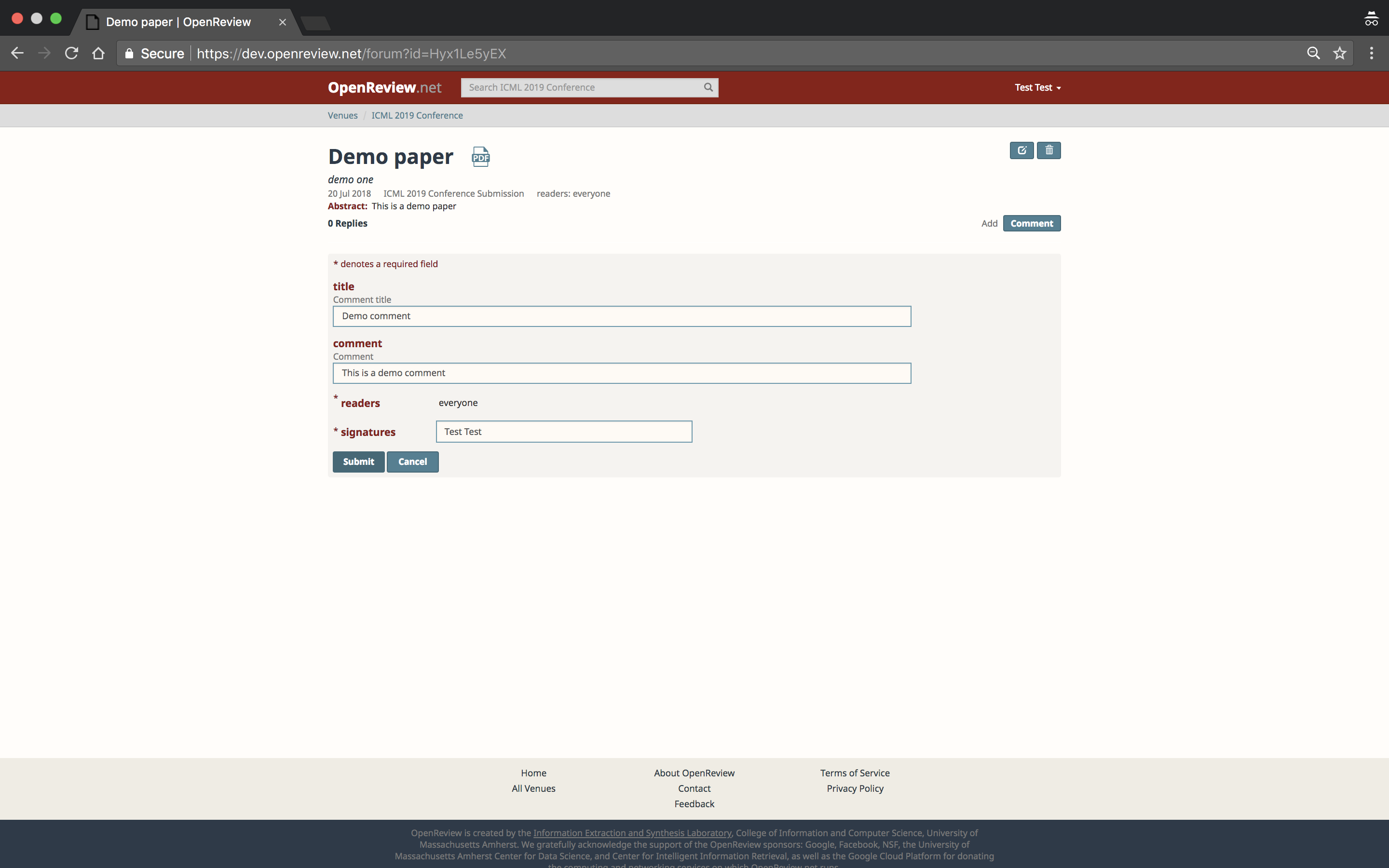
Commenting on a Submission
Users with appropriate access can comment on a submission and reply to other’s comments (depending on the configuration settings of the conference).

Retrieving all notes given an invitation
Users can access all notes by using an invitation id. Important note: only the notes readable by the account the user logged in with can be accessed. Consider the following example which gets all the papers submitted to ICLR 2018:
>>>iclr18_submissions = client.get_notes(invitation="ICLR.cc/2018/Conference/-/Submission")
Please note, get_notes() will return only the first 1000 notes. If you expect the number of notes returned to be more, you will require tools.iterget_notes() which returns an iterator and lets you access all the notes.
Retrieving all Public Comments for a conference
Comments, just like submissions, are saved as notes. So they are also accessible using get_notes(). Note that the invitation argument in get_notes() accepts regex. Consider the following example to get all the “Public Comments” made on submissions in ICLR 2019 conference.:
>>>iclr19_public_comments = client.get_notes(invitation="ICLR.cc/2019/Conference/-/Paper.*/Public_Comment")
This code returns public comments made during the conference “ICLR.cc/2019/Conference” with invitation such as “ICLR.cc/2019/Conference/-/Paper1234/Public_Comment”.
Please note that the invitation regex used in above example represents the convention that OpenReview follows while creating invitations for ICLR Conferences. So, the invitations do not necessarily have to follow this regex for all conferences or workshops.
Retrieving all Official Reviews for a conference
Like comments and submissions, reviews are also usually represented as Notes. Conferences often distinguish reviews written by official conference reviewers with the invitation suffix “Official_Review”.
For example, the reviews in ICLR 2019 all have invitations with the following pattern:
ICLR.cc/2019/Conference/-/Paper.*/Official_Review
To retrieve the Official Reviews for a given ICLR 2019 paper, do the following:
>>> paper123_reviews = client.get_notes(invitation='ICLR.cc/2019/Conference/-/Paper123/Official_Review')
The specific structure of the review’s content field is determined by the conference, but a typical review’s content will include fields like title, review, rating, and confidence:
>>> review0 = paper123_reviews[0]
>>> print(review0.content['rating'])
'8: Top 50% of accepted papers, clear accept'
Conferences as large as ICLR 2019 will often have a number of reviews that exceeds the default API limit. To retrieve all Official Reviews for all ICLR 2019 papers, create an iterator over reviews by doing the following:
>>> review_iterator = openreview.tools.iterget_notes(client, invitation='ICLR.cc/2019/Conference/-/Paper.*/Official_Review')
>>> for review in review_iterator:
>>>     #do something
Retrieving comments made on a forum
All comments made on a particular forum/submission can be extracted like this:
>>>iclr19_forum_comments = client.get_notes(forum="<forum-id>")
Also, the public comments on a particular forum can be extracted like this:
>>>iclr19_forum_public_comments = client.get_notes(forum="<forum-id>", invitation="ICLR.cc/2019/Conference/-/Paper.*/Public_Comment")
Accessing data in comments
The data in a comment, or basically Notes objects, can be accessed like this:
>>>print(iclr19_forum_public_comments[0].content["title"])
>>>print(iclr19_forum_public_comments[0].content["comment"])